Email::contact@vetrixtv.com Whatsapp:+212708830116


How to Fix Buffer Bottlenecks for Faster IPTV Streaming
Learn how to eliminate buffering issues and optimize your network for faster, smoother streaming. Discover effective tips to improve connection stability, reduce lag, and enjoy uninterrupted HD and 4K entertainment.
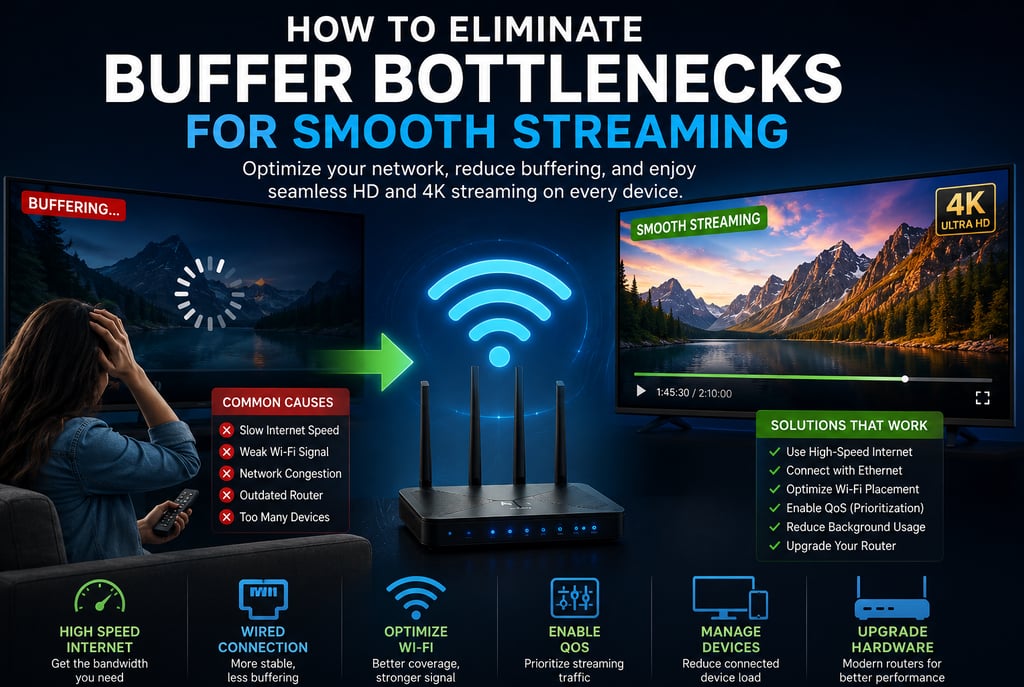
How to Eliminate Buffer Bottlenecks for Smooth Streaming
Buffering is one of the most frustrating problems for online streaming users. Whether you are watching IPTV, Netflix, YouTube, live sports, or 4K content, constant interruptions can ruin the viewing experience. In most cases, buffering happens because of network bottlenecks that limit data flow between your internet connection and streaming device.
In this guide, you will learn how to identify and eliminate buffer bottlenecks to achieve smoother streaming, faster loading times, and better overall network performance.
What Are Buffer Bottlenecks?
A buffer bottleneck occurs when your network cannot transfer streaming data fast enough to your device. As a result, the video pauses while additional data loads.
This issue can be caused by:
Slow internet speeds
Weak Wi-Fi signals
Router congestion
Outdated hardware
High network traffic
Poor IPTV servers
Eliminating these bottlenecks improves stability and reduces interruptions during streaming.
Common Causes of Streaming Buffering
Before fixing the problem, it is important to understand the most common causes of buffering.
1. Insufficient Internet Speed
Streaming high-quality content requires stable bandwidth.
Recommended Speeds:
HD Streaming: 10–15 Mbps
4K Streaming: 25 Mbps or higher
Multiple Devices: 100+ Mbps recommended
Low internet speeds often create major streaming bottlenecks.
2. Weak Wi-Fi Signal
Distance from the router, thick walls, and interference from other devices can weaken your Wi-Fi connection.
Weak signals lead to:
Slow loading
Random freezes
Reduced video quality
3. Network Congestion
When many devices use the internet simultaneously, bandwidth becomes overloaded.
Common bandwidth-heavy activities include:
Online gaming
Video calls
Cloud backups
Large downloads
Smart home devices
This congestion can severely impact streaming performance.
4. Outdated Router Hardware
Older routers may struggle with modern HD and 4K streaming demands.
Routers without:
Wi-Fi 5 or Wi-Fi 6
Dual-band support
Gigabit Ethernet
QoS features
often become performance bottlenecks.
Best Ways to Eliminate Buffer Bottlenecks
Upgrade Your Internet Plan
The first step is ensuring your internet package can handle streaming demands.
Recommended Setup:
Fiber-optic internet whenever possible
High upload and download speeds
Unlimited bandwidth plans
Stable internet is the foundation of smooth streaming.
Use Ethernet Instead of Wi-Fi
A wired Ethernet connection offers:
Lower latency
Faster speeds
More stable connectivity
Reduced interference
For IPTV boxes, Smart TVs, and Apple TV devices, Ethernet is highly recommended.
Optimize Your Router Placement
Router location significantly affects signal quality.
Best Router Placement Tips:
Place it centrally in your home
Keep it elevated
Avoid walls and metal objects
Keep away from microwaves and Bluetooth devices
Proper positioning improves Wi-Fi coverage and reduces dead zones.
Switch to the 5 GHz Band
Modern routers support:
2.4 GHz
5 GHz
Why 5 GHz Is Better for Streaming:
Faster speeds
Less interference
Better performance for HD and 4K streaming
However, 5 GHz works best at shorter distances.
Enable Quality of Service (QoS)
QoS prioritizes streaming traffic over less important network activity.
Benefits of QoS:
Stable IPTV performance
Better video quality
Improved streaming consistency
Most modern routers include QoS settings in the admin panel.
Reduce Background Internet Usage
Background applications often consume hidden bandwidth.
Disable or Limit:
Automatic updates
Cloud synchronization
Large downloads
Unused connected devices
Reducing unnecessary traffic frees bandwidth for streaming.
Upgrade to a Modern Router
If your router is several years old, upgrading can dramatically improve performance.
Recommended Features:
Wi-Fi 6 technology
Dual-band or tri-band support
MU-MIMO technology
Gigabit ports
Beamforming
Modern routers handle multiple streaming devices much more efficiently.
Use a Mesh Wi-Fi System
Large homes often suffer from weak coverage in certain rooms.
Mesh Wi-Fi systems solve this problem by extending coverage throughout the house.
Advantages:
Better signal strength
Seamless roaming
Improved streaming stability
Fewer dead zones
Mesh systems are excellent for multi-room streaming environments.
IPTV Buffering Optimization Tips
IPTV streaming requires especially stable network performance.
Best IPTV Optimization Practices:
Use premium IPTV providers
Connect devices with Ethernet
Restart the router regularly
Clear IPTV app cache
Avoid overloaded servers
Use reliable DNS settings
A good IPTV service combined with a strong network minimizes buffering issues.
Tools to Detect Network Bottlenecks
Several tools can help identify performance problems.
Popular Network Analysis Tools:
Speedtest
NetSpot
Fing
WiFi Analyzer
PingPlotter
These tools help monitor:
Internet speed
Signal strength
Latency
Packet loss
Device congestion
Final Thoughts
Buffering issues can significantly affect your streaming experience, but most bottlenecks can be eliminated with proper network optimization.
By upgrading your internet connection, using Ethernet, enabling QoS, reducing congestion, and investing in modern hardware, you can enjoy smoother IPTV and 4K streaming with fewer interruptions.
Following these strategies will help create a faster, more stable home network optimized for high-quality entertainment and buffer-free performance.
VetrixTV
Cinematic fidelity. Zero-latency routing.
Quick links
Copyright(C) 2026 VetrixTV-Zero-latency routing for premium home theaters.
UNCOMPRESSED 4K BROADCASTING