Email::contact@vetrixtv.com Whatsapp:+212708830116


Best Routers for IPTV
Discover the best routers for IPTV streaming in 2026. Compare top Wi-Fi routers for smooth HD and 4K IPTV performance, reduced buffering, faster speeds, and stable home network connectivity.
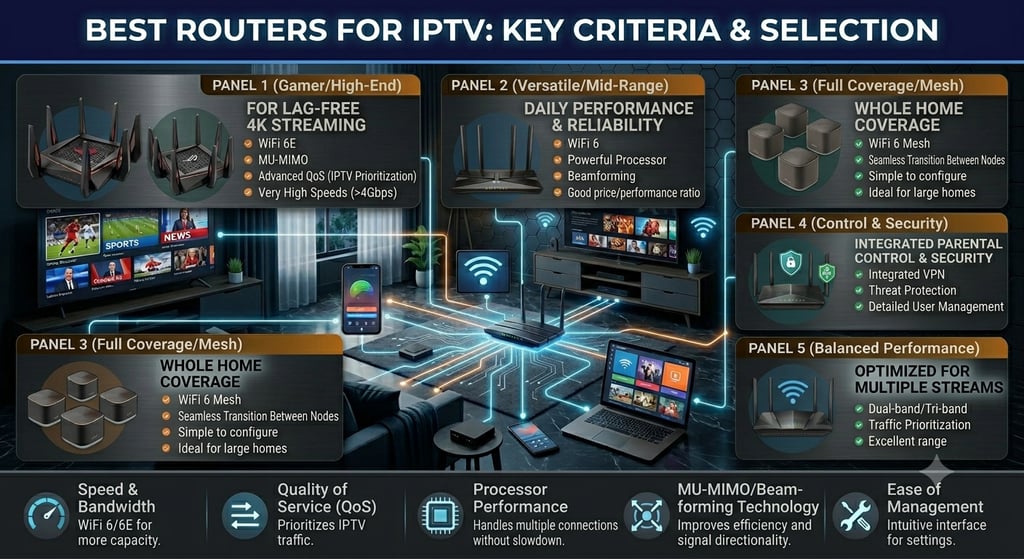
Best Routers for IPTV in 2026: Top Choices for Smooth Streaming
A high-quality router is one of the most important components for achieving smooth IPTV streaming. Even with a fast internet connection, poor router performance can cause buffering, lag, freezing, and unstable video playback.
Whether you stream live sports, movies, or 4K IPTV channels, choosing the best router for IPTV can dramatically improve your viewing experience. In this guide, we compare the top IPTV routers and explain how to choose the ideal model for stable and buffer-free streaming.
Why Your Router Matters for IPTV Streaming
Your router controls how internet traffic moves between your devices and your IPTV provider. If the router cannot handle high bandwidth or multiple devices efficiently, streaming quality suffers.
Common Problems Caused by Weak Routers
Slow channel loading
Lag during live sports
Wi-Fi disconnections
Reduced 4K quality
High latency
Modern IPTV streaming requires routers optimized for speed, stability, and low network congestion.
What Makes a Router Good for IPTV?
Before choosing a router, it is important to understand which features improve IPTV performance.
Important Router Features for IPTV
Wi-Fi 6 Support
Wi-Fi 6 delivers:
Faster speeds
Lower latency
Better device management
Improved streaming stability
This technology is ideal for modern IPTV households.
Dual-Band or Tri-Band Connectivity
Modern routers operate on:
2.4 GHz
5 GHz
Optional additional 5 GHz band
Why It Matters
The 5 GHz band offers:
Faster streaming speeds
Reduced interference
Better HD and 4K IPTV performance
Gigabit Ethernet Ports
Ethernet connections provide:
Stable IPTV streaming
Lower latency
Faster speeds
Minimal buffering
For IPTV boxes and Smart TVs, Ethernet remains the best option.
Quality of Service (QoS)
QoS prioritizes IPTV traffic over other internet activities.
Benefits of QoS
Smoother streaming
Reduced buffering
Better live sports performance
Improved network management
Best Routers for IPTV Streaming
1. ASUS RT-AX88U
Best Overall Router for IPTV
The ASUS RT-AX88U is one of the most powerful Wi-Fi 6 routers available for IPTV streaming.
Key Features
Wi-Fi 6 technology
Ultra-fast speeds
8 Gigabit LAN ports
Advanced QoS settings
Excellent 4K streaming support
Advantages
Outstanding stability
Perfect for large homes
Handles multiple streaming devices easily
Best For
Heavy IPTV users and 4K streaming enthusiasts.
2. TP-Link Archer AX55
Best Budget Wi-Fi 6 Router
The TP-Link Archer AX55 offers excellent IPTV performance at an affordable price.
Key Features
Wi-Fi 6 support
Dual-band connectivity
Low latency
Gigabit Ethernet ports
Strong signal coverage
Advantages
Great value for money
Easy setup
Stable IPTV streaming
Best For
Users seeking affordable IPTV optimization.
3. NETGEAR Nighthawk AX5400
Best Router for 4K IPTV Streaming
This router is designed for high-performance streaming and gaming.
Key Features
Powerful processor
Wi-Fi 6 support
Advanced QoS
Excellent device handling
High-speed wireless coverage
Advantages
Very fast speeds
Strong long-range performance
Reliable live streaming
Best For
Large homes with multiple IPTV users.
4. ASUS RT-AX58U
Best Mid-Range IPTV Router
The ASUS RT-AX58U delivers excellent performance without premium pricing.
Key Features
Dual-band Wi-Fi 6
Adaptive QoS
AiProtection security
Stable IPTV connectivity
Advantages
Excellent balance between price and performance
Easy IPTV optimization
Best For
Families using multiple streaming devices.
5. Google Nest Wi-Fi Pro
Best Mesh Router for IPTV
Mesh systems are ideal for eliminating dead zones in large homes.
Key Features
Whole-home coverage
Wi-Fi 6E support
Smart traffic management
Seamless roaming
Advantages
Strong signal everywhere
Stable IPTV in every room
Easy mobile management
Best For
Large houses and multi-room IPTV setups.
Ethernet vs Wi-Fi for IPTV
Although Wi-Fi technology has improved significantly, Ethernet still provides the most stable IPTV experience.
Ethernet Advantages
Lower latency
Faster speeds
Reduced packet loss
Minimal buffering
Whenever possible, connect IPTV devices directly to the router using Ethernet cables.
How to Optimize Your Router for IPTV
Even the best router requires proper configuration.
IPTV Router Optimization Tips
Enable QoS
Prioritize streaming traffic in router settings.
Use the 5 GHz Band
Avoid crowded 2.4 GHz frequencies.
Place the Router Centrally
Improve signal strength across the home.
Restart the Router Regularly
Refresh network performance.
Update Firmware
Keep security and performance optimized.
Best Internet Speed for IPTV
A strong router works best with adequate internet speed.
Recommended Speeds
HD IPTV: 10–15 Mbps
4K IPTV: 25 Mbps+
Multiple Devices: 100 Mbps+
Fiber internet is highly recommended for stable IPTV streaming.
Common IPTV Router Problems
Weak Signal
Caused by poor placement or interference.
Router Overheating
Can reduce performance during long streaming sessions.
Too Many Connected Devices
Congested networks increase buffering.
Outdated Firmware
Can cause compatibility and speed issues.
Regular maintenance helps avoid these problems.
Final Thoughts
Choosing the best router for IPTV is essential for smooth HD and 4K streaming. A modern router with Wi-Fi 6, Gigabit Ethernet, QoS support, and strong wireless coverage can dramatically reduce buffering and improve streaming stability.
Routers like the ASUS RT-AX88U, NETGEAR Nighthawk AX5400, and TP-Link Archer AX55 offer excellent IPTV performance for different budgets and home sizes.
By combining a high-quality router with fast internet and proper network optimization, you can enjoy reliable IPTV streaming with fewer interruptions and better overall entertainment quality.
VetrixTV
Cinematic fidelity. Zero-latency routing.
Quick links
Copyright(C) 2026 VetrixTV-Zero-latency routing for premium home theaters.
UNCOMPRESSED 4K BROADCASTING