Email::contact@vetrixtv.com Whatsapp:+212708830116


How to Reduce IPTV Buffering ?
DescriptionLearn how to reduce IPTV buffering with proven optimization tips. Improve streaming stability, boost internet performance, and enjoy smooth HD and 4K IPTV viewing without interruptions. de l'article de blog :
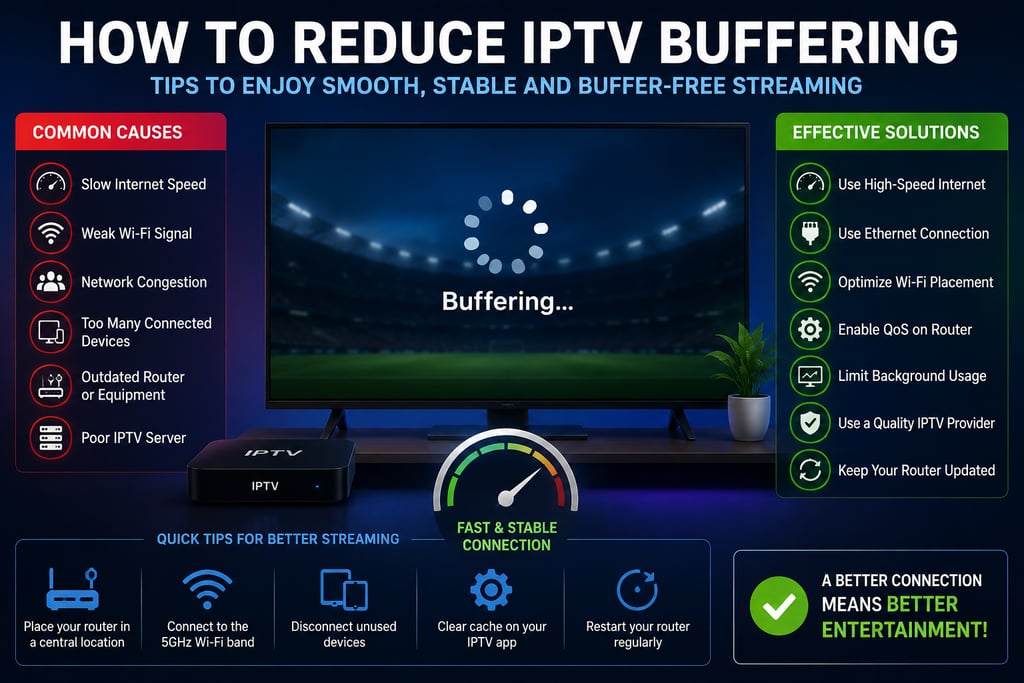
How to Reduce IPTV Buffering: Complete Guide for Smooth Streaming
IPTV services have become increasingly popular for watching live TV, sports, movies, and entertainment online. However, buffering remains one of the most common problems users face while streaming IPTV content. Constant freezing, lagging, and loading interruptions can ruin the viewing experience, especially during live events and 4K streaming.
In this guide, you will learn how to reduce IPTV buffering using proven optimization techniques to enjoy smoother, faster, and more stable streaming.You will also discover how VPN Configuration for Streaming can improve privacy, bypass ISP throttling, and enhance IPTV stability.
What Causes IPTV Buffering?
Before fixing IPTV buffering issues, it is important to understand the main causes behind them.
Common IPTV Buffering Causes
Slow Internet Speed
A weak or unstable internet connection is one of the biggest reasons for IPTV buffering.
Weak Wi-Fi Signal
Poor Wi-Fi coverage can interrupt the connection between your router and streaming device.
Network Congestion
Too many connected devices using bandwidth simultaneously can overload your network.
Outdated Router or Hardware
Old routers and streaming devices may struggle with HD and 4K IPTV streams.
Poor IPTV Server Quality
Some IPTV providers use overloaded or unstable servers that cause freezing and interruptions.
Best Ways to Reduce IPTV Buffering
1. Upgrade Your Internet Connection
A fast and stable internet connection is essential for IPTV streaming.
Recommended Internet Speeds
SD Streaming: 5 Mbps
HD Streaming: 10–15 Mbps
4K Streaming: 25 Mbps or higher
If multiple users stream simultaneously, consider higher bandwidth plans.
Pro Tip
Fiber-optic internet provides the best performance for IPTV streaming because of its low latency and stable speeds.
2. Use Ethernet Instead of Wi-Fi
Although Wi-Fi is convenient, Ethernet connections provide much better stability.
Benefits of Ethernet for IPTV
Lower latency
Faster speeds
Reduced packet loss
More reliable streaming
Connecting your IPTV box, Smart TV, or Apple TV directly to the router can dramatically reduce buffering.
3. Optimize Your Wi-Fi Network
If Ethernet is not possible, improving your Wi-Fi setup can help.
Wi-Fi Optimization Tips
Use the 5 GHz Wi-Fi band
Place the router centrally
Avoid walls and obstacles
Keep the router away from microwaves and Bluetooth devices
Strong Wi-Fi coverage improves IPTV performance significantly.
4. Reduce Network Congestion
Background internet activity can consume valuable bandwidth.
Limit Activities Such As:
Large downloads
Online gaming
Cloud backups
Video calls
Automatic updates
Disconnect unused devices to free up bandwidth for IPTV streaming.
5. Enable QoS on Your Router
Quality of Service (QoS) is a router feature that prioritizes streaming traffic.
Benefits of QoS
Reduced IPTV buffering
Better streaming stability
Improved live sports streaming
Faster channel loading
You can enable QoS from your router settings panel.
6. Restart Your Router Regularly
Routers can slow down after running continuously for long periods.
Restarting Helps:
Refresh the connection
Clear temporary network issues
Improve performance
Restarting your router once every few days can improve streaming quality.
7. Keep Your IPTV App Updated
Outdated IPTV applications may contain bugs or compatibility issues.
Regular Updates Improve:
Stability
Security
Playback performance
Channel compatibility
Always use the latest version of your IPTV player.
8. Clear IPTV App Cache
Over time, IPTV apps accumulate temporary files that may affect performance.
Clearing Cache Can:
Improve loading speed
Reduce freezing
Free device memory
This is especially useful for Android TV and Firestick users.
9. Choose a Reliable IPTV Provider
Even a perfect network setup cannot fix poor IPTV servers.
Look for IPTV Providers That Offer:
Stable servers
Anti-freeze technology
Fast support
HD and 4K optimization
High uptime
Premium IPTV providers usually deliver better streaming quality.
10. Upgrade Your Router
Older routers may not support modern streaming demands.
Recommended Router Features
Wi-Fi 6 support
Dual-band or tri-band technology
Gigabit Ethernet ports
MU-MIMO technology
Modern routers handle IPTV traffic much more efficiently.
Best Devices for Buffer-Free IPTV Streaming
Some devices perform better than others for IPTV streaming.
Recommended Devices
Apple TV
NVIDIA Shield
Amazon Fire TV Stick 4K
Android TV Boxes
Smart TVs with strong processors
Using powerful streaming hardware reduces lag and improves playback quality.
How to Reduce IPTV Buffering on Firestick
Firestick users can optimize performance with these quick tips:
Firestick IPTV Optimization
Clear app cache regularly
Use lightweight IPTV apps
Connect to 5 GHz Wi-Fi
Restart the Firestick
Use Ethernet adapters if possible
These steps can greatly improve IPTV stability.
How to Reduce IPTV Buffering During Live Sports
Live sports streaming requires extra network stability.
Tips for Sports Streaming
Close background apps
Use Ethernet connections
Stream in HD instead of 4K if needed
Avoid peak internet hours
Lower latency improves the live viewing experience.
Tools to Test IPTV Network Performance
Several tools help monitor your connection quality.
Useful Tools
Speedtest
WiFi Analyzer
PingPlotter
NetSpot
These tools help identify:
Speed problems
Weak Wi-Fi zones
Packet loss
High latency
Final Thoughts
Learning how to reduce IPTV buffering can dramatically improve your streaming experience. Most buffering issues are caused by weak internet connections, poor Wi-Fi coverage, overloaded networks, or low-quality IPTV servers.
By optimizing your network, using Ethernet, enabling QoS, updating your hardware, and choosing a reliable IPTV provider, you can enjoy smoother HD and 4K IPTV streaming with minimal interruptions.
A well-optimized setup ensures faster loading times, stable playback, and a much better entertainment experience overall.
VetrixTV
Cinematic fidelity. Zero-latency routing.
Quick links
Copyright(C) 2026 VetrixTV-Zero-latency routing for premium home theaters.
UNCOMPRESSED 4K BROADCASTING