Email::contact@vetrixtv.com Whatsapp:+212708830116


the best VPN configurations for streaming in 2026
Learn the best VPN configurations for streaming in 2026. Discover how to optimize VPN settings for IPTV, Netflix, sports, and 4K streaming with faster speeds, better privacy, and reduced buffering.l'article de blog :
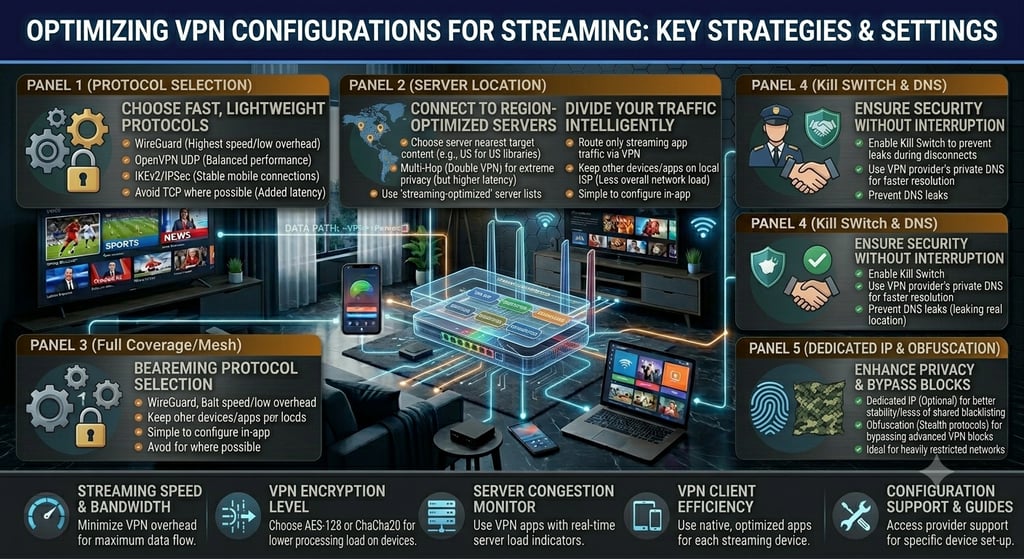
VPN Configurations for Streaming: Complete Optimization Guide
Streaming platforms and IPTV services have become essential for modern entertainment. However, many users experience buffering, geo-restrictions, slow speeds, and privacy concerns while streaming online. Proper VPN configuration can significantly improve streaming performance, security, and accessibility.
In this guide, you will learn the best VPN configurations for streaming, including how to optimize VPN settings for IPTV, Netflix, live sports, and 4K content without sacrificing speed or stability.
Why Use a VPN for Streaming?
A VPN (Virtual Private Network) encrypts your internet connection and routes your traffic through secure servers located around the world.
Benefits of Using a VPN for Streaming
Access Geo-Restricted Content
Watch content unavailable in your region.
Improve Privacy
Hide your IP address and protect your online activity.
Prevent ISP Throttling
Some internet providers slow down streaming traffic. VPNs help bypass these restrictions.
Secure Public Wi-Fi Streaming
Protect your data when using public networks.
Access International IPTV Channels
Stream channels and content from multiple countries.
How VPNs Affect Streaming Performance
Although VPNs improve privacy and accessibility, poor VPN configurations can reduce streaming quality.
Common VPN Streaming Problems
Slow connection speeds
Increased latency
IPTV buffering
Connection drops
Poor 4K streaming quality
Optimizing VPN settings is essential for smooth streaming.
Best VPN Protocols for Streaming
The VPN protocol determines speed, security, and stability.
1. WireGuard
Why It’s Best
WireGuard is one of the fastest VPN protocols available.
Advantages
Extremely fast speeds
Low latency
Excellent 4K streaming performance
Reduced buffering
Best For
IPTV, Netflix, sports streaming, and gaming.
2. OpenVPN UDP
Advantages
Stable performance
Good balance between speed and security
Reliable for IPTV streaming
Best For
Users wanting compatibility across multiple devices.
3. IKEv2/IPSec
Advantages
Fast reconnection
Excellent for mobile streaming
Stable wireless performance
Best For
Streaming on smartphones and tablets.
Best VPN Server Locations for Streaming
Choosing the right VPN server location can dramatically improve streaming speed.
Tips for Selecting Servers
Choose Nearby Servers
Closer servers usually provide:
Faster speeds
Lower latency
Better streaming stability
Avoid Overloaded Servers
Busy servers often cause buffering and lag.
Use Streaming-Optimized Servers
Many premium VPN providers offer servers optimized specifically for streaming platforms.
Best VPN Settings for IPTV Streaming
IPTV requires low latency and stable bandwidth.
IPTV VPN Optimization Tips
Use WireGuard Protocol
Provides faster IPTV performance.
Connect via Ethernet
Ethernet reduces packet loss and improves stability.
Use 5 GHz Wi-Fi
Improves speed and reduces interference.
Disable Unnecessary VPN Features
Some security features can reduce speed unnecessarily during streaming.
Avoid Double VPN
Double encryption may significantly slow streaming speeds.
How to Reduce Buffering While Using a VPN
Buffering is one of the biggest concerns for VPN users.
Effective Solutions
Use High-Speed VPN Providers
Choose VPN services known for streaming performance.
Select Less Congested Servers
Avoid servers with high user traffic.
Lower Streaming Resolution Temporarily
Switching from 4K to HD can stabilize playback if bandwidth is limited.
Restart Router and VPN Connection
Refreshing connections can improve speed.
Best VPN Features for Streaming
Kill Switch
Protects privacy if the VPN disconnects unexpectedly.
Split Tunneling
Allows you to route only streaming apps through the VPN.
Benefits
Faster overall internet speed
Better streaming optimization
Smart DNS
Some VPN providers offer Smart DNS for:
Faster streaming
Lower latency
Easy Smart TV configuration
Best VPNs for Streaming in 2026
1. NordVPN
Fast WireGuard-based NordLynx protocol
Excellent streaming support
Reliable IPTV performance
2. ExpressVPN
High-speed servers
Strong privacy features
Excellent Smart TV compatibility
3. Surfshark
Affordable pricing
Unlimited device connections
Good 4K streaming performance
4. CyberGhost
Streaming-optimized servers
User-friendly interface
Good for beginners
VPN Configuration for Smart TVs
Many Smart TVs do not support VPN apps directly.
Best Solutions
Install VPN on the router
Use Smart DNS
Share VPN connection from a PC
This allows all streaming devices to benefit from VPN protection.
VPN Setup for Apple TV and Firestick
Apple TV
Use:
Smart DNS
VPN-enabled router
AirPlay from VPN-connected devices
Firestick
Install VPN apps directly from the Amazon App Store.
Recommended VPNs:
NordVPN
ExpressVPN
Surfshark
Common VPN Streaming Mistakes
Using Distant Servers
Increases latency and buffering.
Choosing Free VPNs
Free VPNs often have:
Slow speeds
Data limits
Weak security
Ignoring Router Performance
Weak routers can bottleneck VPN traffic.
Using TCP Instead of UDP
TCP offers better reliability but slower streaming performance.
Best Internet Speed for VPN Streaming
VPN encryption slightly reduces speed, so a fast internet connection is important.
Recommended Speeds
HD Streaming: 15 Mbps
4K Streaming: 30 Mbps+
Multiple Devices: 100 Mbps+
Fiber internet provides the best experience for VPN streaming.
Final Thoughts
Proper VPN configurations for streaming can improve privacy, unlock geo-restricted content, and optimize IPTV and 4K streaming performance. By selecting the right protocol, server location, and VPN settings, users can enjoy smoother playback with minimal buffering.
Using modern VPN technologies like WireGuard, high-speed servers, Ethernet connections, and streaming-optimized settings ensures the best possible entertainment experience across IPTV services, Netflix, live sports, and Smart TVs.
VetrixTV
Cinematic fidelity. Zero-latency routing.
Quick links
Copyright(C) 2026 VetrixTV-Zero-latency routing for premium home theaters.
UNCOMPRESSED 4K BROADCASTING