Email::contact@vetrixtv.com Whatsapp:+212708830116


What Is QoS and How Does It Improve Streaming? The Ultimate Guide
Learn how Quality of Service (QoS) eliminates buffering and lag. Discover how configuring QoS on your router prioritizes streaming traffic for flawless 4K video.
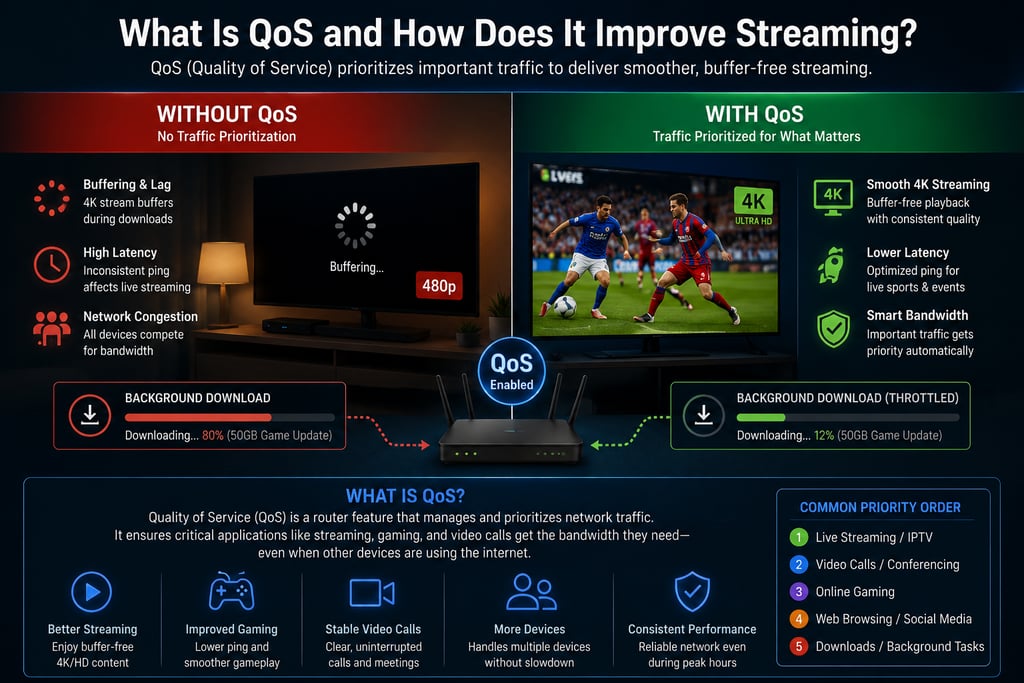
What Is QoS and How Does It Improve Streaming?
Have you ever been in the middle of a crucial live sports match or an intense movie scene, only for the video to freeze because someone else in your house started downloading a massive file or updating a video game?
Network congestion is the ultimate enemy of a smooth entertainment experience. Fortunately, there is a powerful network technology built into almost all modern routers designed to solve this exact problem: Quality of Service (QoS).
Here is a deep dive into what QoS is, how it works, and how it can instantly upgrade your streaming quality.
1. What is Quality of Service (QoS)?
At its core, Quality of Service (QoS) is a network management feature that prioritizes internet traffic. Think of your home internet connection as a highway. Without QoS, all data packets—whether they are crucial live video frames, an email, or a background software update—are treated like identical cars stuck in the same traffic jam.
When you enable QoS, you essentially create an "emergency lane" on that highway. You tell your router which types of data are most important, allowing those packets to cut to the front of the line while less urgent data waits its turn.
2. How Does QoS Actually Improve Streaming?
Video streaming, especially in 4K resolution or live IPTV, requires a continuous, uninterrupted flow of data. Unlike web browsing, where a two-second delay in loading a page is barely noticeable, a two-second drop in streaming data results in immediate buffering.
QoS improves your streaming experience in three major ways:
A. Eliminating "Buffer Bloat"
When your bandwidth is maxed out by multiple devices, your router tries to temporarily store extra data packets in its memory (a process called buffering). This creates artificial lag. QoS prevents this by capping the bandwidth of non-essential devices so your streaming device always has breathing room.
B. Reducing Packet Loss
If a network gets too crowded, the router will simply drop data packets. For a video stream, lost packets mean pixelated screens, skipped frames, or total stream disconnection. QoS ensures streaming packets are never dropped.
C. Minimizing Jitter
Jitter is the variance in time between data packets arriving at your device. High jitter causes choppy audio and video synchronization issues. QoS stabilizes the delivery rate of video data, keeping your playback perfectly smooth.
3. Real-World Example: With vs. Without QoSScenario
Quality of Service, or QoS, is one of the most effective router features for improving IPTV and 4K streaming performance in a busy home network. Its role is simple: prioritize the traffic that matters most, such as live TV, sports streams, or 4K movies, while temporarily reducing the bandwidth allocated to less urgent activities.
Without QoS enabled, your home network usually works on a first come, first served basis. That means every device competes equally for bandwidth, regardless of what it is doing. In practice, this can create serious streaming issues. For example, if someone in the house starts downloading a 50GB video game, your 4K movie may immediately drop in quality, buffer repeatedly, or even stop playing altogether. The same thing can happen during live sports if another person is scrolling social media, watching short videos, or using bandwidth-heavy apps in the background.
When QoS is enabled, the router becomes much smarter about how it distributes bandwidth. Instead of treating every activity equally, it identifies the most important traffic — such as your IPTV stream — and gives it priority. So if someone starts a large game download while you are watching a 4K movie, the router can throttle the download speed automatically to preserve the stream’s quality. The movie continues playing smoothly in full 4K, while the background download simply takes a little longer.
The same logic applies to everyday multitasking. Without QoS, casual activities like scrolling social media or watching videos on a phone can create micro-stutters and instability during live IPTV events. With QoS active, the router prioritizes the live stream and allows the phone content to load slightly more slowly if necessary, ensuring that the most time-sensitive content remains stable.
In short, QoS transforms your network from a chaotic “first come, first served” system into an intelligently managed environment where bandwidth is allocated based on application importance. For IPTV users, especially those streaming live sports or 4K content, this can make the difference between constant buffering and a seamless premium viewing experience.
4. How to Set Up QoS for Better Streaming
Setting up QoS is done through your home router’s settings page. While every router brand (like ASUS, Netgear, or TP-Link) has a slightly different interface, the general steps remain the same:
Access your router: Type your router’s IP address (usually 192.168.1.1 or 192.168.0.1) into a web browser and log in.
Find the QoS settings: Look for a tab labeled "Advanced," "Traffic Manager," or "Quality of Service."
Enable QoS: Toggle the feature on.
Select your priority mode: * By Application: Select "Streaming" or "Media" as the highest priority.
By Device: Find your Smart TV, Roku, Firestick, or Apple TV in the device list and assign it "High" or "Highest" priority.
Save and Restart: Save the settings and let the router reboot.
The Verdict: Is QoS Worth It?
If you live alone and only connect one or two devices to the internet, you likely won't need QoS. However, if you live in a multi-device household where gaming, working from home, and streaming happen simultaneously, QoS is an absolute game-changer.
By spending just five minutes configuring your router’s QoS settings, you can permanently relegate the dreaded buffering wheel to the past and enjoy flawless, uninterrupted streaming.
VetrixTV
Cinematic fidelity. Zero-latency routing.
Quick links
Copyright(C) 2026 VetrixTV-Zero-latency routing for premium home theaters.
UNCOMPRESSED 4K BROADCASTING