Email::contact@vetrixtv.com Whatsapp:+212708830116


Ethernet vs. Wi-Fi for IPTV Streaming: Which is Better for Buffer-Free Video?
Tired of IPTV buffering? Compare Ethernet vs. Wi-Fi for live streaming and discover the best connection to get stable 4K quality without lag.
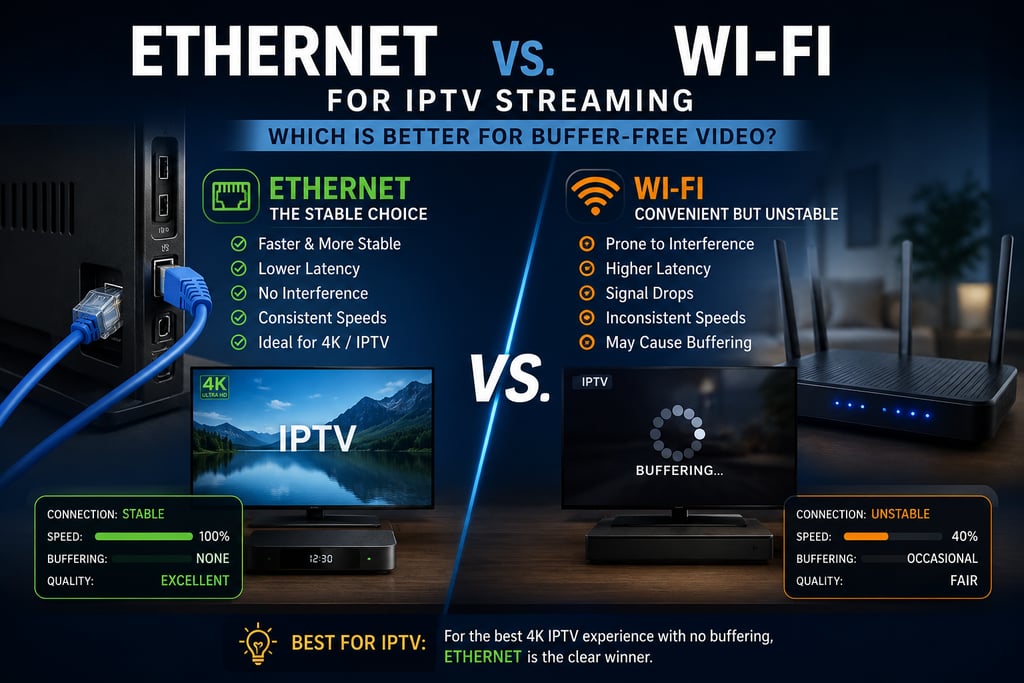
Ethernet vs. Wi-Fi for IPTV Streaming: Which is Better for Buffer-Free Video?
Internet Protocol Television (IPTV) has completely changed how we consume media, offering instant access to live sports, international channels, and massive on-demand libraries. However, there is one universal enemy that can ruin movie night or a live match: the dreaded buffering wheel.
To achieve seamless streaming in Full HD or 4K, your internet speed isn't the only thing that matters—how you deliver that internet to your device (Smart TV, Android Box, or Firestick) is just as critical. In this guide, we will pit Ethernet (wired) against Wi-Fi (wireless) to determine the ultimate champion for IPTV streaming.
1. Why IPTV Demands a Flawless Connection
Unlike mainstream platforms like Netflix or YouTube, which heavily use "pre-buffering" (caching minutes of video ahead of time), live IPTV streams deliver data in real-time.
Because the data packets are being sent exactly as events happen, any minor packet loss, latency spike, or signal drop will immediately result in a freeze or lag on your screen. This makes your choice of home network setup incredibly important.
2. Ethernet (Wired): The Undisputed King of Stability
If your goal is a pure, headache-free streaming experience, plugging a physical cable directly from your router into your streaming device is the gold standard.
The Pros:
Guaranteed Speed: You get the maximum bandwidth your internet service provider offers without wireless degradation.
Ultra-Low Latency (Ping): Minimizes the delay behind the actual live broadcast.
Zero Interference: Thrives completely unbothered by thick walls, heavy furniture, or neighboring electronic signals.
The Cons:
Lacks Mobility: Requires running physical wires through your living space, which can look untidy if not hidden behind walls or baseboards.
3. Wi-Fi (Wireless): High Convenience with a Catch
Wi-Fi offers unparalleled convenience, freeing your living room from cluttered cables. However, that freedom comes with invisible compromises that can harm live streams.
The Pros:
Ultimate Cleanliness: No ugly wires stretching across hallways or rooms.
Easy Setup: Instantly connects any TV or streaming stick anywhere in the house.
The Cons & IPTV Pitfalls:
Signal Interference: Baby monitors, microwaves, bluetooth devices, and your neighbors' routers all compete for the same airwaves, causing micro-drops in your stream.
Physical Obstacles: Solid concrete walls and metal studs degrade wireless signals significantly.
Jitter and Fluctuations: Wireless speeds fluctuate constantly. A speed drop that lasts only two seconds is unnoticed while browsing the web, but it will freeze a live IPTV match.
Quick Comparison: Ethernet vs. Wi-Fi for IPTV
When it comes to IPTV streaming, choosing between Ethernet and Wi-Fi can have a major impact on performance, especially for 4K content, live sports, and buffer-free viewing.
An Ethernet connection, also known as a wired connection, is widely considered the best option for streaming because it delivers excellent stability and consistent reliability. Unlike wireless networks, Ethernet provides a direct connection between your router and your streaming device, which results in extremely low latency and minimal packet loss. This makes it particularly effective for live sports, real-time events, and ultra-high-definition 4K streams, where even small interruptions can affect the viewing experience. Another major advantage of Ethernet is that it is not affected by walls, distance, or household interference, making it the most dependable solution for uninterrupted IPTV playback. The only drawback is that it requires physical cable installation, which may be less convenient depending on your home setup.
Wi-Fi, on the other hand, offers the convenience of a wireless and instant connection, making it easy to connect smart TVs, streaming boxes, and mobile devices without additional cabling. However, Wi-Fi performance is generally less stable and more variable than Ethernet. Signal strength can be affected by walls, furniture, distance from the router, and network congestion, all of which may increase latency and reduce streaming consistency. While a strong modern Wi-Fi network can handle HD and even some 4K streaming, its performance for IPTV often depends heavily on router quality, frequency band, and proximity to the access point. In busy households or larger homes, this can lead to buffering, quality drops, or interruptions during live viewing.
In short, if your goal is to achieve the most stable, low-latency, and reliable IPTV experience, especially for 4K/UHD channels and live sports, Ethernet is the recommended choice. Wi-Fi remains a practical solution for convenience and flexibility, but it cannot always match the consistency and performance of a wired connection.
4. Forced to Use Wi-Fi? How to Optimize It for IPTV
If running an Ethernet cable is physically impossible in your home, you must optimize your wireless setup to prevent buffering. Make sure you use a Dual-Band router and choose the right frequency:
5 GHz Band (The Best Choice): This frequency offers massive speeds and has much less congestion from other devices. However, its range is short. Use this only if your streaming device is in the same room or very close to the router.
2.4 GHz Band (Avoid If Possible): It travels further and passes through walls better, but it is much slower and incredibly crowded. Streaming high-definition IPTV on 2.4 GHz is a recipe for constant buffering.
The Verdict: Which One Should You Choose?
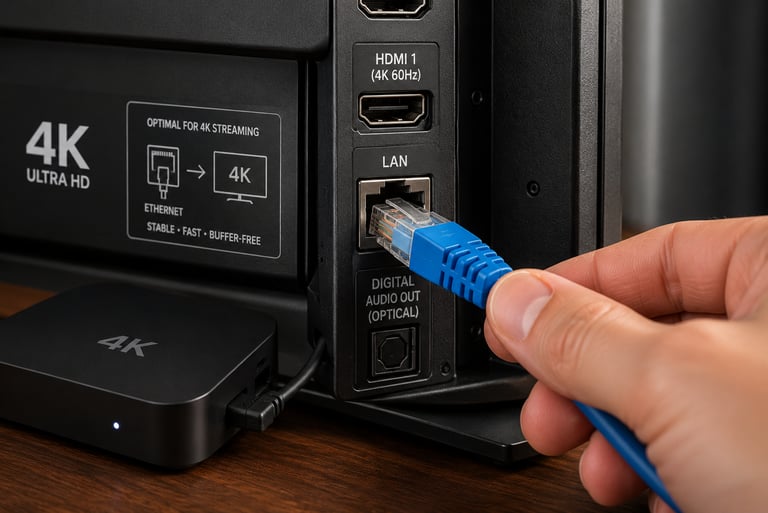
For the absolute best, buffer-free IPTV experience, Ethernet is the undisputed winner. If you are watching live events, sports, or heavy 4K streams, connecting your streaming box directly via a LAN cable will save you endless frustration.
Use Wi-Fi on the 5 GHz band as your backup option, but try to keep the distance between your router and your TV as short as possible to ensure your stream stays up to speed.
VetrixTV
Cinematic fidelity. Zero-latency routing.
Quick links
Copyright(C) 2026 VetrixTV-Zero-latency routing for premium home theaters.
UNCOMPRESSED 4K BROADCASTING